Your Invisible AI Meeting Assistant
Live transcription, AI-powered Q&A, and real-time insights — fully local on your Mac with Ollama or LM Studio (Qwen3). Completely invisible to screen sharing.
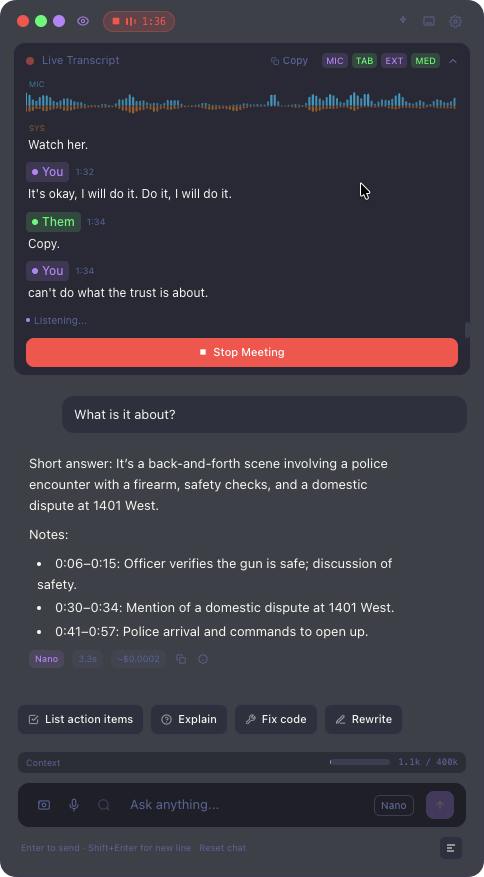
Everything you need in meetings
A complete AI toolkit that runs silently alongside your meetings, giving you superpowers without anyone knowing.
Live Transcription
Real-time, accurate transcription of your meetings with speaker identification. Powered by local Whisper models — no cloud needed.
AI Chat
Ask questions about your meeting in real-time. Use Ollama or LM Studio with Qwen3 for fully local, free AI — or OpenAI for best cloud-powered results.
Real-time Insights
Automatic detection of questions, decisions, action items, and key topics as your meeting progresses.
Screen-share Invisible
Completely hidden from screen sharing tools. Your AI assistant stays private — only you can see it.
Privacy First
Fully local when using Ollama or LM Studio with Qwen3 — transcription and AI run entirely on your Mac. No audio or transcript data ever leaves your device.
Chrome Extension
Seamlessly capture audio from Google Meet, Zoom, Teams, and any browser-based meeting with one click.
Scribely vs Cluely
Same concept, completely different execution. Faster, private, free, and actually built for real professionals.
Scribely is free. Cluely charges up to $75/mo for features we include by default.
Local processing means instant responses. No 5-10 second cloud round-trips.
With Ollama or LM Studio, nothing leaves your Mac. Cluely sends everything to their servers.
Get started in 3 steps
From download to your first AI-powered meeting in under a minute.
Install
Download the Scribely app for Mac and the optional Chrome extension. Setup takes under a minute.
Start Meeting
Join any video call. Scribely automatically detects and begins analyzing the audio.
Get Insights
Access real-time transcription, AI chat, and live insights — all privately on your screen.
See it in action
A powerful overlay that stays out of your way while giving you everything you need.
Loved by professionals
Teams across industries trust Scribely to make their meetings more productive.
“Scribely changed how I handle meetings. I no longer scramble to take notes — I just focus on the conversation and let the AI handle the rest.”
Sarah Chen
Product Manager, TechCorp
“The fact that it's invisible to screen sharing is a game-changer. I can get AI assistance during client calls without anyone knowing.”
Marcus Johnson
Sales Director, GrowthCo
“Privacy was my biggest concern with meeting AI tools. Scribely runs 100% locally — that sold me immediately.”
Emily Park
Engineering Lead, SecureStack
Frequently asked questions
Everything you need to know about Scribely.
Ready to transform your meetings?
Download Scribely for free. Use OpenAI for best results, or Ollama / LM Studio with Qwen3 for fully local AI — no API keys needed.